Designing Business Plans That Respect Your Energy and Build Growth
By: Lydia Chan
For entrepreneurs with disabilities building online shops, service businesses, or community-based ventures, business planning often comes packaged with expectations that don’t fit real bodies and brains. Traditional planning limitations, long work sessions, dense documents, constant context-switching, and rigid timelines, can create physical, cognitive, and sensory strain that turns “being prepared” into burnout. The result is a cruel tension: the planning meant to support growth becomes another barrier to inclusive entrepreneurship. Accessible business planning challenges those defaults so planning can match working capacity and still move a business forward.
Understanding Accessible Planning Systems
Accessible planning systems are planning routines built around how you actually function day to day. Instead of forcing one “right” method, you choose adaptive, sensory-friendly tools and steps that reduce physical effort and mental overload. Planning becomes something your capacity can hold, not something you have to push through.
This matters because consistency comes from plans that fit real life, including flare days, brain fog, pain, or sensory overload. When your workflow is lower-friction, you make clearer decisions and protect energy for serving customers. It also reduces the guilt spiral that can happen when a rigid plan breaks.
Think of it like setting up a kitchen for an injured wrist. You move the heavy items closer, use easier grips, and prep in shorter bursts based on your sensory profile. Many businesses already rely on adaptive systems, and tools like Workday show it with 5,900 customers. That same “fewer steps” mindset also applies to AI-made visuals for pitches and simple marketing.
Create On-Brand Visuals in Minutes to Cut Planning Friction
When your planning system already reduces strain, the next win is removing the extra effort it takes to show your ideas clearly. AI art tools can make accessible business planning feel lighter by turning text prompts into useful visuals fast, without the manual steps that can drain time, hands, eyes, or focus.
Instead of wrestling with design software to build pitch deck graphics, concept mockups, or simple marketing images from scratch, you can type what you need (for example, “minimalist slide illustration of a service workflow, brand colors, clean lines”) and get an image in moments. From there, you can refine what it generates by adjusting the style, colors, and lighting until it fits your brand and your message.
If you want a concrete example, an AI art generator can help you create specific images quickly from a prompt and then customize the look to match your existing materials, supporting clearer communication with fewer steps and less energy.
A Repeatable Planning Flow You Can Return To
Planning gets easier when you have a rhythm you can rely on, even on low-capacity days. This workflow helps you keep your business plan clear and actionable by building in accessibility from the start, not as an afterthought.
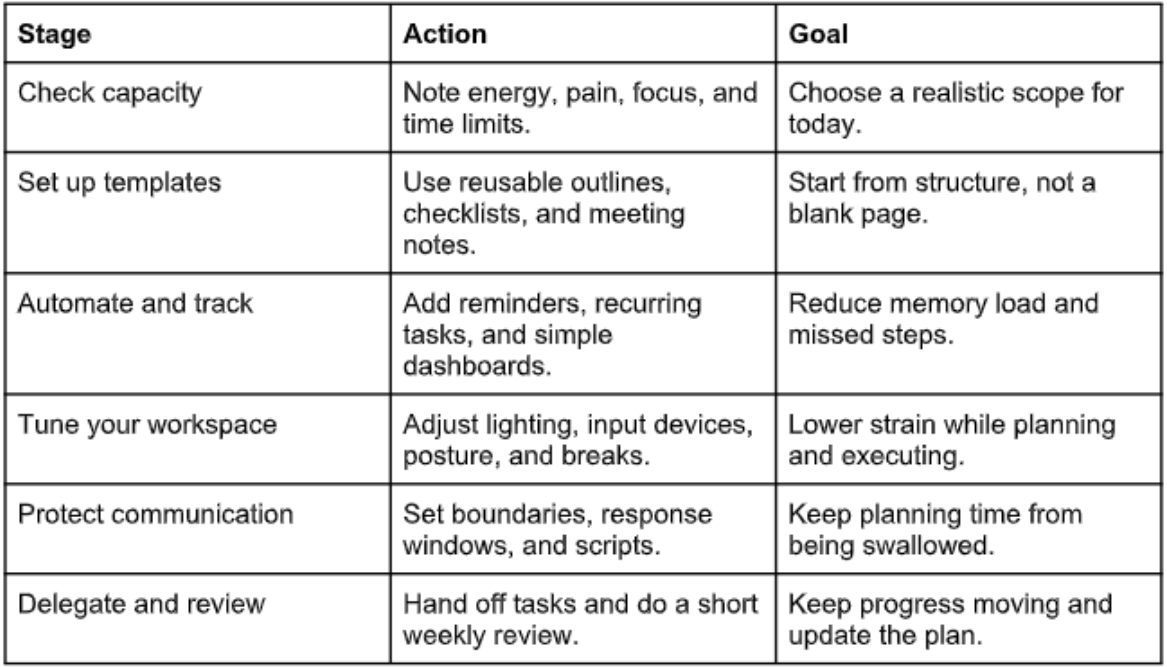
Each stage supports the next: you plan to your capacity, build a steady base, then protect it with automation, setup, and boundaries. The review loop brings you back to reality so you can adjust without scrapping everything.
Accessible Business Planning Questions, Answered
Q: What planning tools should I start with if I get overwhelmed easily?
A: Start with one home base: a simple doc or notes app that holds your plan, plus a basic to do list. Choose tools that work with your access needs first, like dictation, large text, or keyboard shortcuts. Give yourself a two week trial, then keep only what you actually used.
Q: How do I plan when my health and energy change week to week?
A: Build two versions of your plan: a “good day” target and a “low capacity” minimum. Tie tasks to time and effort levels, like 10 minute admin, 30 minute outreach, or deep work. That way, progress stays possible without forcing consistency your body cannot guarantee.
Q: Can I look credible if my business plan is short and flexible?
A: Yes. A clear, updated one page plan can look more professional than a long document you cannot maintain. A practical definition of strategic planning is that it can guide your decisions, and short plans do that well.
Q: Should I use a traditional business plan template or a lean model?
A: Use the format that helps you take action. Lean plans work well when you need fewer sections and faster updates, while traditional plans can help with loans or grants. You can also blend them: lean weekly, traditional quarterly.
Q: What if I miss deadlines or fall behind on my plan?
A: Treat it as feedback, not failure. Reset the timeline, reduce the scope, and write down one reason it got hard so you can adjust next time. A plan is a living support, not a test you pass or fail.
Protect Founder Well-Being While Planning for Real Business Growth
When health varies and energy is limited, business planning can feel like choosing between staying well and looking professional. Self-compassionate business planning offers a steadier approach: flexible growth strategies that honor capacity while keeping priorities clear and decision-making credible. With that mindset, balancing health and professionalism becomes less of a daily battle, and sustainable entrepreneurship starts to feel doable week after week. Plan around your capacity, not around guilt.